All manual edits can be used for active training of AI models. In other words, every manual correction that you do on the point cloud can be applied to future projects.
Point cloud annotation can be done easily with the use of intuitive tools. From each selection, a cross-section view can be generated for easier final selection.
Annotations can be done in a perspective or orthographic 3D view. You can either annotate and assign points to classes from scratch or annotate point clouds that were automatically classified using an AI model.
A variety of tools are available
Each action can be triggered using keyboard shortcuts to further reduce the time needed for annotations.
Rectangle selection
Strip selection
Polygon selection
Clipping
See the tools in action
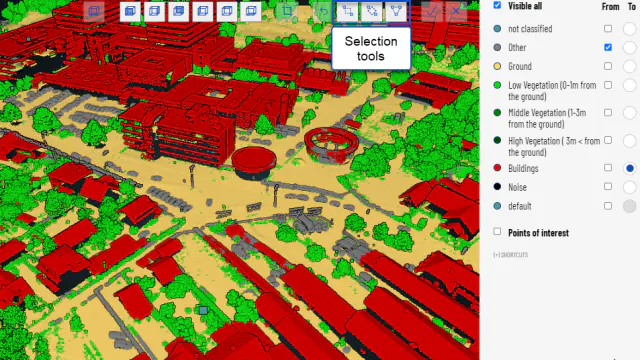
Selection tools
Rectangle, strip, and polygon selections tools are available.
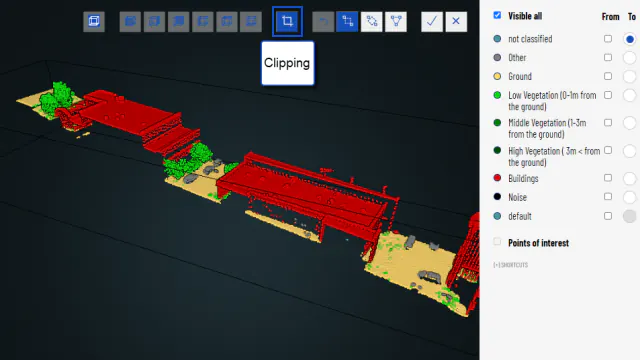
Clipping
Clipping is used to display only the selected portion of the scene. This way it is easier to annotate point clouds and focus on the area of interest.
Annotate point clouds
Choose the selection tool and define "from" and "to" which class the point should be assigned. Switch between different views — classification, intensity, and RGB — effortlessly using keyboard shortcuts.
Clipping within clips
Utilize clipping to simplify the annotation process. We empower you to perform clipping within clips.
Move with strips
You can navigate within the clip using the keyboard's arrow keys (up, down, left, and right), making it a valuable tool for manual annotations.
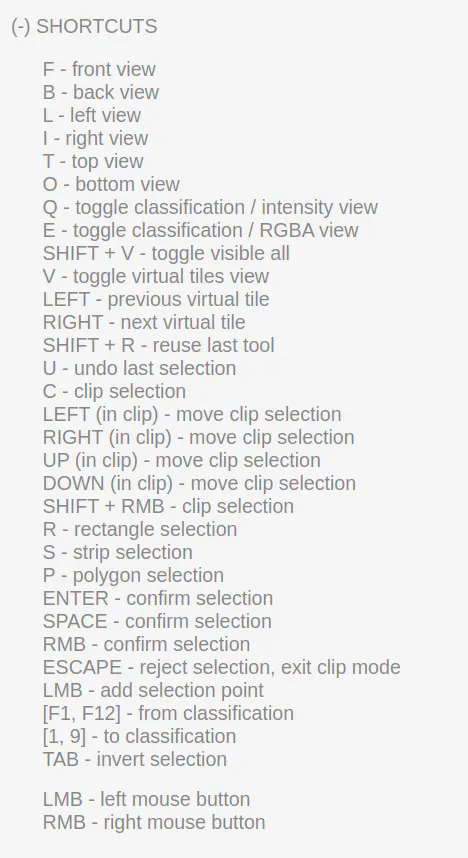
Keyboard shortcuts
A set of keyboard shortcuts is available in order to speed up annotations.